
If you’ve logged into your bank, Costco or Amazon account lately, you’ve probably been nudged to “create a passkey.” Some people tap yes without knowing what they agreed to. Others like me I’m sure dismiss it like another annoying cookie banner.
A recent critique of passkeys by The Hack argued that they’re a Trojan horse that lets tech companies decide what software you’re allowed to run. A security researcher quickly replied that refusing passkeys only makes you easier to rob. So what’s going on here?
How is a passkey different from a password?
A password is a secret I know and type or use a password manager to retrieve its randomly generated characters. Anyone who steals it, guesses it using a brute-force automated process, or tricks me into typing it on a fake site can take over my account.
A passkey works differently. When a website asks me to create one, whatever manages my logins (password manager, Apple/Google, security key) makes a matched pair of digital keys. The website keeps one half, and the login manager keeps the other locked away. To log in, my device proves it holds the matching half after I unlock it with my face, fingerprint or whatever, but the point is, nothing is typed and each passkey is tied to the web address that created it. If a scam email links to “examp1e.com” instead of “example.com,” I might type my password into the fake page, but my device won’t offer the passkey, because examp1e.com isn’t the site that created it.
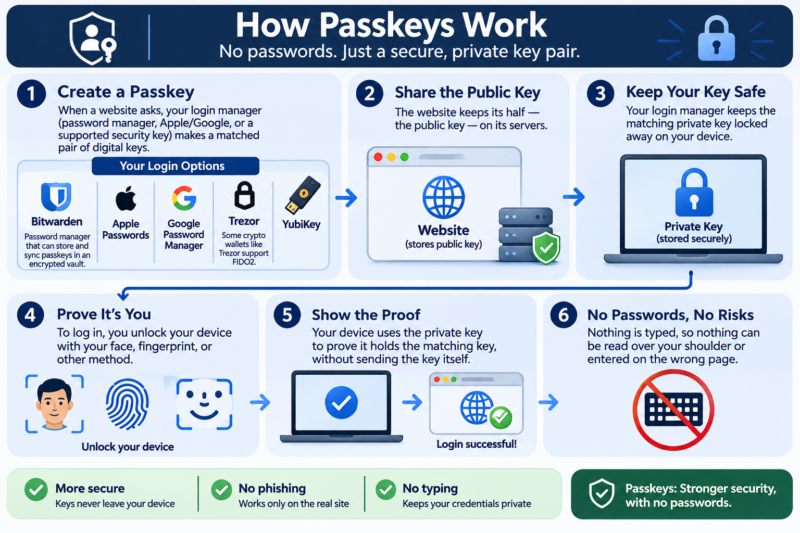
The six-digit codes from authenticator apps and text messages share the same weakness of passwords: they’re secrets a person can be tricked into handing over. So naturally, criminals have built many-a-toolkit to exploit them.
The most common tool is a fake login page that relays my password and code to the real site within seconds, and the criminal is logged in as me. Microsoft documented one such campaign that targeted more than 10,000 organizations. Other criminals just call, posing as the bank’s fraud department, and ask me to read the code back. That’s how funds get drained.
With text-message codes there are weaknesses too because they go to a phone number, not a phone. A criminal can talk a carrier into moving my number to their SIM card, or exploit flaws in the network carriers use to route texts, known as SS7.
Some services replace codes with a pop-up asking “Is this you signing in?” Attackers who already have a password trigger dozens of these until someone clicks “Approve”. This “push bombing” is how an attacker got into Uber’s internal systems in 2022.
The Cybersecurity and Infrastructure Security Agency (CISA) rates app and text codes as vulnerable to phishing and notes that push bombing, SS7, and SIM swap attacks don’t work against passkeys. Passkeys don’t fix everything though. Criminals can still talk a help desk into resetting an account, or use malware to hijack a session after I’ve logged in, but they close the most common way in.
The FIDO Alliance, the industry group behind passkeys, estimates about 5 billion passkeys are in use: a few percent of the world’s password-protected accounts, but more than a third of sign-ins at the large services that share data with FIDO.
What is “The Hack” worried about?
The Hack’s central fear is a feature called attestation. Think of a key stamped with the name of the locksmith who cut it. The lock still opens for whoever holds the key, but the owner can choose to accept only keys from approved locksmiths. Attestation lets a website ask for that stamp: proof of which device or software created a passkey. The fear is that sites will gradually use it to shut out anyone on an unapproved phone, modified software or an alternative operating system.
For the passkeys most people use, that isn’t how it works. Passkeys stored in Apple’s iCloud Keychain, Google Password Manager, 1Password or Bitwarden (what I use) don’t carry the stamp at all, so a website that demanded it would lock out most of its own customers. Where attestation does exist, mostly on physical security keys like YubiKeys, it identifies the make and model of the key, not your operating system or browser extensions.
In July 2025 the National Institute of Standards and Technology (NIST) finalized guidelines that explicitly accept passkeys that sync across devices and say the missing stamp should not block their use on public-facing services. A tax portal or benefits site doesn’t need to know what phone you’re using to keep your account safe; that’s the point of passkeys.
So creating a passkey today doesn’t hand anyone the power to lock down your phone.
The Hack still gets several things right. “Passkey” is a catch-all label for different things. Some passkeys sync across devices and some never leave one device; some can be copied and some can’t. You usually aren’t told which kind you’re creating. That’s not a conspiracy, but it’s not design with the user’s interest in mind either. FIDO is made up of tech companies, security vendors, banks, and government agencies. Consumer advocates aren’t involved.
The defaults also favor the platforms. Unless you tweak the settings, your passkeys save to your Apple or Google account. Independent managers like 1Password and Bitwarden can compete, but only through settings menus and system interfaces that Apple and Google design. It’s a familiar story. So, in 2023, 1Password, Bitwarden, Dashlane and NordPass started building a way to move passkeys between providers, and Apple and Google eventually joined, since fear of lock-in was slowing adoption. The result, the Credential Exchange Protocol, makes leaving easier, but it doesn’t change where new passkeys land by default. For most people, the keys to every other account will still end up with Apple and Google, and losing that one account means losing access to everything.
What do I use? Bitwarden’s free password manager. Its master password is a passphrase I made by rolling casino dice and matching each roll to a word on the EFF’s word list: random enough that no one can guess it, and easy enough for me to remember. I bought the dice after the Coldcard hack, hands down the best money I’ve spent on my digital security. Good enough for now.
While writing this, I learned that Bitwarden can store passkeys too. I’d used it for years without knowing. That’s the competition problem in a nutshell. The independent option exists, but unless I enable it in my phone’s settings, the “create a passkey” prompt defaults to Apple or Google.
Cui Bono from FIDO?
Aside from Apple and Google, banks benefit because device checks reduce fraud and shift responsibility to the customer when fraud happens. Federal rules require banks to refund unauthorized transfers, but not payments that we approve, even if a scammer talks us into it. A device check gives the bank a clean record that the payment came from the customer’s phone, which makes the line between “hacked” and “tricked” much easier to draw in the bank’s favor.
Netflix will welcome anything that stops password sharing.
People who want to choose their own software lose out: privacy-minded users, people keeping an old phone alive with community-built updates, and independent developers. They are few and carry no political or economic weight.
Where the real fight is
So the device lockdown The Hack fears is real. It’s just happening through apps, not passkeys. Google offers app developers a service called Play Integrity that checks whether an Android phone runs software Google has certified. Apple offers a similar service called App Attest. Banks have adopted these checks quickly. One casualty is GrapheneOS, a version of Android built for privacy and security, which fails Google’s check for one reason: Google hasn’t certified it. Its users have been locked out of Revolut, Volkswagen’s car app and some government apps.
Governments are running into the same question. The European Union is building an app that lets people prove they’re adults without handing over their name or ID. An early version listed Google’s and Apple’s device checks as planned features. After public outcry, the developer promised other options, and the written specification never names Apple’s or Google’s services. It only requires that the phone’s secure hardware vouch for the app. On paper, that’s neutral.
In practice, someone still has to decide whose signatures to trust, and according to the developers of one alternative Android system, the standard tools trust Google-approved software by default. Countries building their own wallets on top of the app can also add Google’s or Apple’s stricter checks outright. So a rule that never mentions Google or Apple can still make proving your age depend on owning a phone one of them has approved, the same kind of device check NIST concluded public services don’t need for passkeys.
The UK has gone further. In June, the Prime Minister announced that phones and tablets should block nudity by default, with adults able to opt out by verifying their age, and gave companies three months to comply or face legislation. A block that only age-verified adults can switch off works only if the phone can prove it hasn’t been modified to remove it. That proof is a device check, the link between the UK’s proposal and the attestation The Hack is worried about.
Refusing passkeys does nothing about any of this, because an app can run these checks no matter how you log in. The question of which phones count as trustworthy is being settled now, mostly by Google, Apple and maybe the governments that lean on them.
What should ideally happen
The goal isn’t to slow passkey adoption; passkeys stop the most common way people get robbed online. The goal is to keep the security benefits from becoming a way to control which devices and software people can use. Four changes would help:
- No single-vendor gatekeeping.
Banking and government services shouldn’t depend on two companies’ approval when open hardware checks can do the job. From a public policy perspective, all we care about is that hardware wasn’t tampered with. European regulators have already used the Digital Markets Act to make Google and Apple let people pick their own browser and search engine instead of accepting the default. The open question is whether they’ll use it here too, so that Google’s certification stops deciding which phones can open a banking app or prove their owner’s age. - A real ability to take your credentials with you.
The transfer standard moves passkeys between companies’ apps, but never to a copy you control. Hardware can. A YubiKey holds up to 100 passkeys and works with any phone or computer, with no company account involved, though it can’t be copied, so you need a spare registered with every site. Some crypto hardware wallets go further. A Trezor can back up its passkeys using the same recovery phrase that protects its coins, so a lost device can be restored. That backup still requires a command-line tool. Making it as easy as tapping “create a passkey” would give people a copy of their own keys that no company account controls. - How about some plain and simple disclosure?
People should be told what kind of passkey they’re creating and whether a site asked to verify their device. - A choice of password managers at setup
This won’t happen on its own of course. Android phones in Europe show choice screens for search engines and browsers because the European Commission fined Google over Android in 2018, a penalty Europe’s top court upheld in July, and because the Digital Markets Act now requires them. Will Bitwarden and its peers fight for that moment as hard as Google fought for search?
Bottom-line
Passkeys are one more identifier in a growing pile that includes domain names, SIM cards, advertising IDs and mobile driver’s licenses. At the Internet Governance Project, we study how these systems shape who controls what online, most recently at our September workshop on digital identifiers. One lesson keeps coming up: an identifier system is a chain of decisions about who issues a credential, who keeps the records and who checks it, and the fights happen at whichever link someone can control. With passkeys, the credential itself mostly works. The contested links are who holds it and which devices are trusted to present it. Those decisions are hard to undo, because a system built to check someone’s age can check other things. So if you want to use passkeys, pay attention to who decides which phones are allowed to hold them.
